






Building A1 DDP - Dubai Silicon Oasis
Industrial Area - 342001 -
Dubai - United Arab Emirates
+971 50 756 2346


SERVICES

COMPANY LINKS
SIGN-UP
For Newsletter



You’re here because picking the best UI design tools feels harder than it should.
Should you go all-in on one design tool? Stack a few other tools together for seamless integration? Or choose a platform with built-in prototyping tools, UI kits, and smooth handoff to devs?
If you’ve been stuck comparing tabs and Reddit threads for top UI design tools, you’re in the right place.
This guide gives you a clear breakdown of tools used by top designers, so you can focus on better UX design, faster user flows, and smarter collaboration using the right web-based tool from day one.
Before we go further, let’s take a quick look at this comparison table for the best UI design tools:
UI and UX design tools have evolved rapidly in response to changing workflows, remote collaboration, and increased demand for smarter, more integrated platforms.
For modern teams, it’s no longer just about crafting wireframes. It’s about choosing a web-based tool that enables real-time collaboration, automates the design process, and simplifies design handoff to developers.
More than ever, teams need great online tools that support the full UI UX design process, from research and ideation to prototyping, handoff, and iteration.
This shift is being driven by a few key trends:
With so many popular tools available, picking the right one depends on your workflow, team structure, and even platform (e.g., Mac vs. Windows).
Designers today are looking for more than drag-and-drop features. They want problem solving, speed, and design systems that scale.
The next sections will break down the best UI design tools across categories (from industry standards to emerging AI solutions) so you can choose the perfect fit for your projects, team, and development goals.
Before we dive into emerging platforms and AI-powered options, let’s start with the foundational UI design tools trusted by professionals for years.
Figma has quickly become one of the best UI design tools thanks to its powerful, web-based platform and seamless collaboration features.
It allows designers, developers, and stakeholders to work in real time. No more syncing files or juggling exports. With built-in prototyping tools, component libraries, and smart layout systems, it supports every step of the design process, from wireframes to design handoff.
Its user-friendly interface is ideal for both beginners and teams managing complex design systems.
Whether you're building a product from scratch or scaling an interface with front-end developers, Figma adapts. It’s widely used in UI design services due to its versatility, ease of use, and community-backed plugin ecosystem.
For anyone looking to learn UI design basics or streamline branding and product design, Figma is a go-to UI design tool that sets the bar.
Sketch was one of the first modern design tools built specifically for UI design and remains a favorite among Mac users.
It’s lightweight yet robust, offering crisp vector editing, reusable components via Symbols, and clean export options tailored for developers. It’s especially good for pixel-perfect interfaces and high-fidelity screens in ui toolkit in real projects.
While it lacks some of the real-time collaboration seen in web-based tools like Figma, Sketch integrates well with other tools like Zeplin and Abstract for design handoff.
It’s still used by over a million designers daily, proof of its continued relevance in the current state of UI/UX.
Adobe XD was built to give UI designers a dedicated space to create responsive designs, interactive prototypes, and smooth animations.
If your design process already involves Photoshop, Illustrator, or After Effects, XD offers a seamless handoff between tools and teams. It’s especially helpful for teams focused on UI implementation consulting or working across complex projects that blend design and content creation.
While Adobe recently announced it won’t heavily update XD moving forward, it remains a reliable UI design tool for those embedded in Adobe’s creative suite.
With tools like Repeat Grid for quick layout duplication and voice trigger support, XD still holds value for UI design projects that need advanced interactivity or dev mode-ready specs for front end developers.

Balsamiq is one of the most beginner-friendly UI design tools, especially for teams looking to move fast without getting lost in details.
Its hand-drawn, low-fidelity style makes it perfect for early brainstorming, aligning with core UI design principles, like focusing on layout before visuals. It’s a go-to for those learning UI UX design basics, or working on early-stage client feedback within a UI toolkit in real projects.
Although it lacks advanced prototyping tools or interactive components, Balsamiq shines where simplicity matters. It’s often used in UI design examples and case studies to explain core ideas before diving into tools like Figma or XD.
For startups or user experience design teams who need to develop user flows without distraction, Balsamiq gets the job done (fast!).
Affinity Designer is a solid, budget-friendly alternative to Adobe Illustrator for UI design work.
It combines powerful vector editing tools with real-time performance, making it ideal for creating components, layouts, and visuals without breaking the bank.
Many small teams and freelancers turn to Affinity to cut down on recurring software costs, an important consideration when managing overall UI UX design cost.
While it isn’t purpose-built as a UI design tool, its flexibility allows designers to develop prototypes, design assets, and export code snippets or visuals for dev teams.
It’s not a replacement for tools like Figma or XD but works well alongside them, especially for photo editing, icons, or custom graphics within larger design systems.
While not designed specifically as UI design tools, Adobe Illustrator and Photoshop remain industry staples for asset creation.
UI teams often use them to develop pre made assets, icons, animation-ready components, and high-quality visuals for use in other design tools like Figma or XD.
These tools are best suited for developers, illustrators, and designers working on branding, interface elements, or layered compositions. They’re widely used in advanced design workflows, especially where detail and pixel precision matter.
Though not ideal for interactive prototypes or design collaboration, they’re excellent for supporting the UI design process with stunning visuals.
Canva is not a traditional UI design tool, but its simplicity and user friendly templates make it useful for quick layout mockups and presentations.
It’s great for beginners or non-designers who need to create simple UI screens, concept slides, or social assets fast. With thousands of pre made assets, it's often used to mock up basic flows during early ux process discussions.
That said, Canva lacks the depth of design systems, dev mode, and developer-ready features required in serious UI projects. It's more of a creative assistant than a full-fledged prototyping tool.
But for early idea sharing, stakeholder pitches, or light user experience design tasks, Canva offers a fast and accessible solution (especially for marketing teams and founders working outside the core design team).
Some UI tools can help you build interactive prototypes, test user flows, and streamline design handoff to developers.
These platforms are perfect for turning mockups into working experiences and keeping your entire design process connected.
Let’s look at some of the best UI tools for this:
InVision Studio is a motion-friendly UI design tool that’s ideal for designers who want to bring their interfaces to life.
With its timeline-based editor, you can create advanced transitions and interactive prototypes that closely mimic real user experiences. It’s especially useful when showcasing flows for apps, websites, or onboarding walkthroughs.
Although it doesn't have the real-time collaboration of tools like Figma, InVision Studio remains one of the most powerful prototyping tools for animation-heavy projects.
Many teams use it alongside other design software for richer storytelling during the UX design phase or when presenting high-fidelity demos to clients and stakeholders.

Marvel simplifies the design process with a lightweight platform tailored for speed. Its intuitive interface lets you upload designs, link screens, and share interactive prototypes in minutes.
It’s especially handy for quick feedback loops or internal reviews before committing to full development.
While Marvel isn’t built for complex animation or advanced component libraries, it’s great for solo designers, students, or teams who need to validate ideas fast.
It also integrates basic user testing tools, which can help teams gather insights early in the UX design cycle.
UXPin stands out for its ability to generate interactive prototypes that behave like real products.
Unlike most design tools, it bridges the gap between UI and development with logic-based components, conditional interactions, and built-in data support.
Designers can build advanced workflows without writing code, while developers get instant access to code snippets, documentation, and shared libraries.
For teams working on complex apps or multi-layered projects, UXPin offers a unique all-in-one tool that streamlines both design and implementation.
Axure RP is a powerhouse UI design tool designed for creating logic-heavy, dynamic prototypes.
It goes far beyond click-through mockups, letting designers build interactive prototypes with real input fields, conditions, and variables. This makes it especially valuable for enterprise teams working on complex software interfaces, admin portals, or high-stakes websites.
Its ability to simulate real user behavior and present fully functional flows makes it ideal for UI/UX teams doing deep research, testing, or pitching advanced product concepts.
Though the learning curve is steeper than other tools, Axure’s depth and flexibility make it a standout for teams that needs interactions that mirror real product behavior.
Zeplin isn’t a prototyping tool, but it plays a critical role in the design process by acting as the bridge between designers and developers.
Once your screens are finalized in tools like Figma, Sketch, or Adobe XD, Zeplin takes over, extracting spacing, styles, colors, and code snippets developers can immediately use.
It also generates shared style guides, helping ensure consistent UI across teams and projects.
For teams seeking a smoother handoff workflow, Zeplin reduces miscommunication and saves dev teams time digging through layered design files. It's one of the most trusted tools in modern product teams, especially when clean specs are a must.
AI is transforming how designers work speeding up workflows, automating layout decisions, and enabling faster iteration.
These next-gen UI design tools are perfect for designers who want to generate wireframes, interfaces, and even interactive prototypes with minimal effort and top speed.

Uizard makes it incredibly easy to create functional UIs from plain text or hand-drawn sketches.
You describe your idea, and it uses AI to generate wireframes or high-fidelity mockups. No design experience required. It’s used by teams at Google, Tesla, and Slack, proving its place as more than a novelty among design tools.
It’s especially perfect for MVPs, pitch decks, or fast iterations, Uizard cuts hours from the design process.
With built-in UI components, export options, and interactive prototypes, it’s a great option for startups or product teams exploring ideas quickly. It’s especially useful for UI/UX design sprints where speed and agility matter most.
Framer blends visual design and development into a single UI design tool, letting teams go from idea to fully deployable website with zero code.
With recent AI-powered updates, Framer can now assist in content generation, auto-layout, and structural suggestions ideal for teams moving fast.
Designers can craft prototypes with real-world functionality, animations, and even host live pages, all within the platform.
It’s one of the few prototyping tools that balances visual ease with dev-ready features, making it perfect for projects where both design and code performance matter.
Whether you’re building a landing page or an app UI, Framer brings the speed of AI with the depth of code-backed design.

Galileo AI takes AI-driven interface design to the next level by creating visually polished, high-fidelity UI mockups directly from natural language prompts.
Unlike simpler tools, Galileo emphasizes design quality. Its outputs look like real, production-ready screens, not placeholders. Designers can then refine the layout via a chat interface for fast, iterative improvements.
Once finalized, users can export the layout straight into Figma, making it a practical addition to your existing UI design tool stack.
Whether you’re crafting product pages, dashboards, or app interfaces, Galileo is ideal for projects where visual appeal, speed, and design process efficiency matter most.
Magic Patterns helps designers generate clean, customizable UI components. Think buttons, cards, headers, and full layouts, based on pre-set logic and design trends.
It’s not a full UI design tool, but a smart companion that speeds up early wireframes or helps you build consistent interfaces fast.
Users can tweak parameters (like spacing, color, or layout rules) and export the result directly into Figma, where further customization or prototyping can continue.
For designers who want a head start or are building out scalable design systems, Magic Patterns fills a unique gap in the UI tool ecosystem by offering AI-accelerated inspiration and structure.
Beyond mainstream design platforms, several tools support specific stages of the UI/UX process (like planning flows, building wireframes, or managing design systems).
These tools help teams document ideas, organize components, and bring structure to the design process.

Penpot is a rising star in the world of UI design tools, especially for open-source advocates and teams that need complete control over their design stack.
It offers a clean, browser-based interface similar to Figma and supports interactive prototypes, team collaboration, and reusable components.
Unlike most other tools, Penpot is fully open-source and can be self-hosted, making it ideal for privacy-focused teams or organizations with unique deployment needs.
It’s a great fit for startups or dev-centric teams that want flexible design software without subscription fees, while still supporting modern workflow expectations.

FlowMapp helps designers and strategists map out user flows, sitemaps, and app journeys before diving into visual mockups.
It’s not a full-fledged UI design tool, but it’s essential for planning structured digital experiences. With intuitive drag-and-drop features and pre-built elements, teams can create site maps and flows quickly.
This tool is especially helpful in early-stage UI/UX design where research and architecture matter more than visual polish.
It aligns closely with the UI/UX process and helps teams plan pages, screen hierarchies, and interactions clearly.
Wireframe.cc is a super minimalist tool built for fast sketching of early interface ideas.
Its blank canvas approach helps designers and product teams lay out basic elements (headers, buttons, content blocks) without distraction.
It’s ideal for teams that want to create wireframes during brainstorming or client calls. While it lacks advanced prototyping or style features, its strength lies in speed and clarity.
If you’re working on a fast-turnaround website or app idea, Wireframe.cc keeps things simple and focused.
Storybook isn’t a UI design tool in the traditional sense. It’s a developer-friendly platform that helps teams document, organize, and test individual UI components.
It’s especially useful for larger teams building complex design systems or reusable UI kits across multiple apps or projects.
By showcasing components in isolation, with live previews and documentation, Storybook helps ensure consistency in development and design alignment.
It’s frequently used in modern front-end workflows where clean code, structured UI elements, and scalable design are non-negotiable.
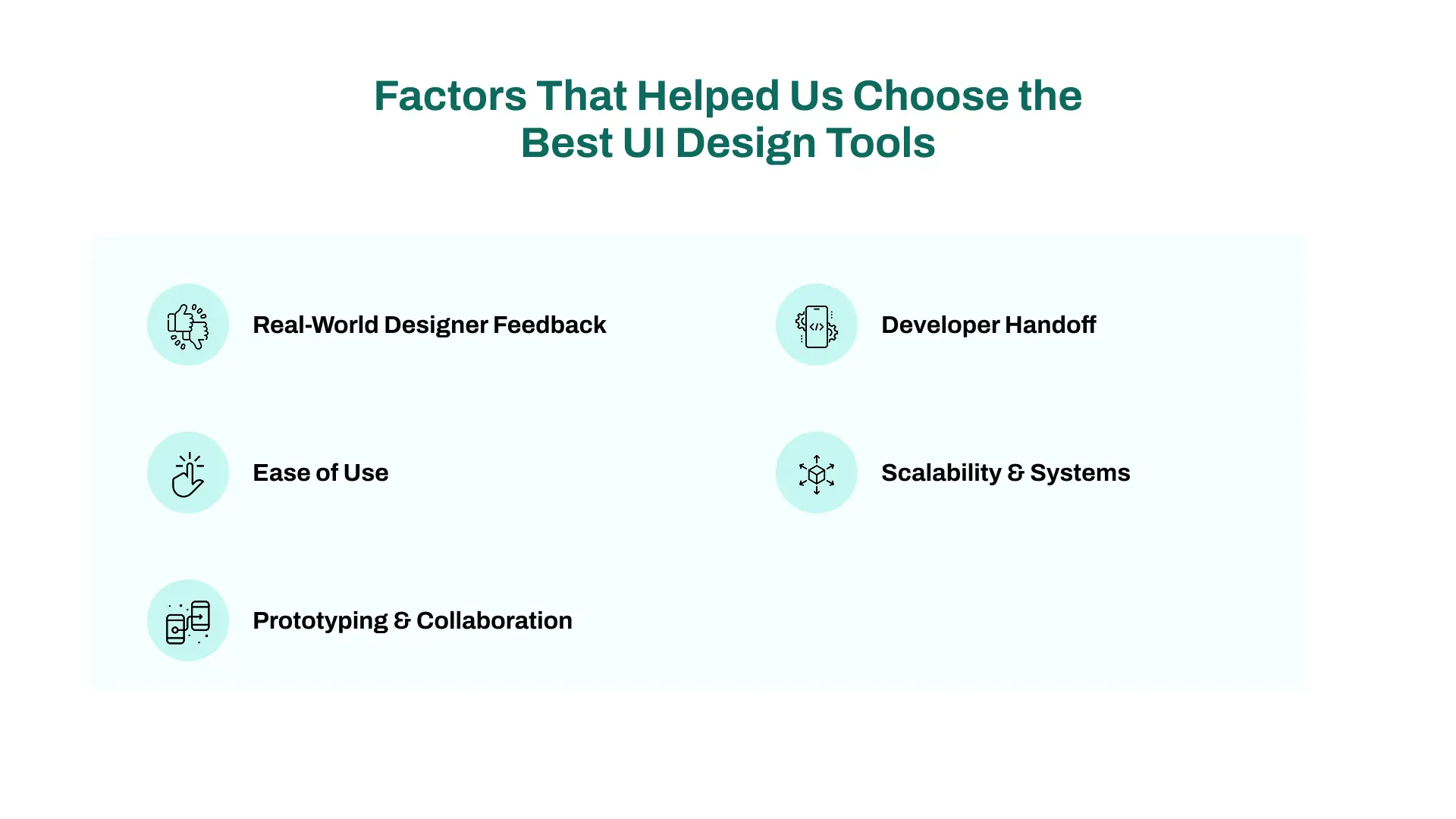
We didn’t just rely on feature lists. We tested these tools hands-on, read through user reviews, and evaluated real-world design workflows.
Here are the key factors that helped us narrow down the best UI design tools for modern teams.
We reviewed hundreds of user experiences, Reddit threads, and G2/Trustpilot reviews to understand how these tools perform in real-world scenarios.
Tools used and loved by designers globally carried more weight in our selection.
A great UI design tool shouldn’t require a week to master.
We looked for platforms with clean interfaces, intuitive features, and strong onboarding (specially for beginners and growing product teams).
Since collaboration is essential in the design process, we favored tools with built-in interactive prototypes, commenting, and real-time collaboration.
Seamless team workflows were a must.
We prioritized tools that support smooth design handoff through code snippets, specs, and dev-friendly exports.
This helps reduce friction between designers and front end developers.
We also checked how well each tool handles design systems, component libraries, and multi-project setups.
Tools that grow with your team (across multiple products or platforms) ranked higher.
No single tool fits every designer, team, or stage of a project.
That’s why we compared each tool based on how well it supports the full UI/UX design process, from early ideation to developer handoff.
If you're just starting out or switching tools, simplicity matters.
Modern design is collaborative by default.
Prototyping features vary widely, from simple clicks to logic-based flows.
Smooth design handoff avoids friction between designers and developers.
The more your team or product grows, the more important design systems become.
No single tool does it all. But together, the best UI design tools can cover every stage of your UX process.
Whether you're building a full website or a quick MVP, choosing the right tools at the right time saves hours and improves outcomes.



Areesha is a content writer with over 2 years of experience in writing about tech and digital trends. She focuses on topics like AI, remote work, and productivity.
Her blogs have helped startups grow their content reach and improve lead generation. She writes with a focus on clarity, simplicity, and reader value.